FollowersssBuy
HOW FOLLOWERSSSBUY WORKS

Choose clearly.
Track every step.

A practical tour of our ordering interface, delivery references and support tools. The screenshots use the real interface in an isolated demonstration account, with public service data and no customer orders.

01 / FIND AND ORDER

A service choice you can inspect.

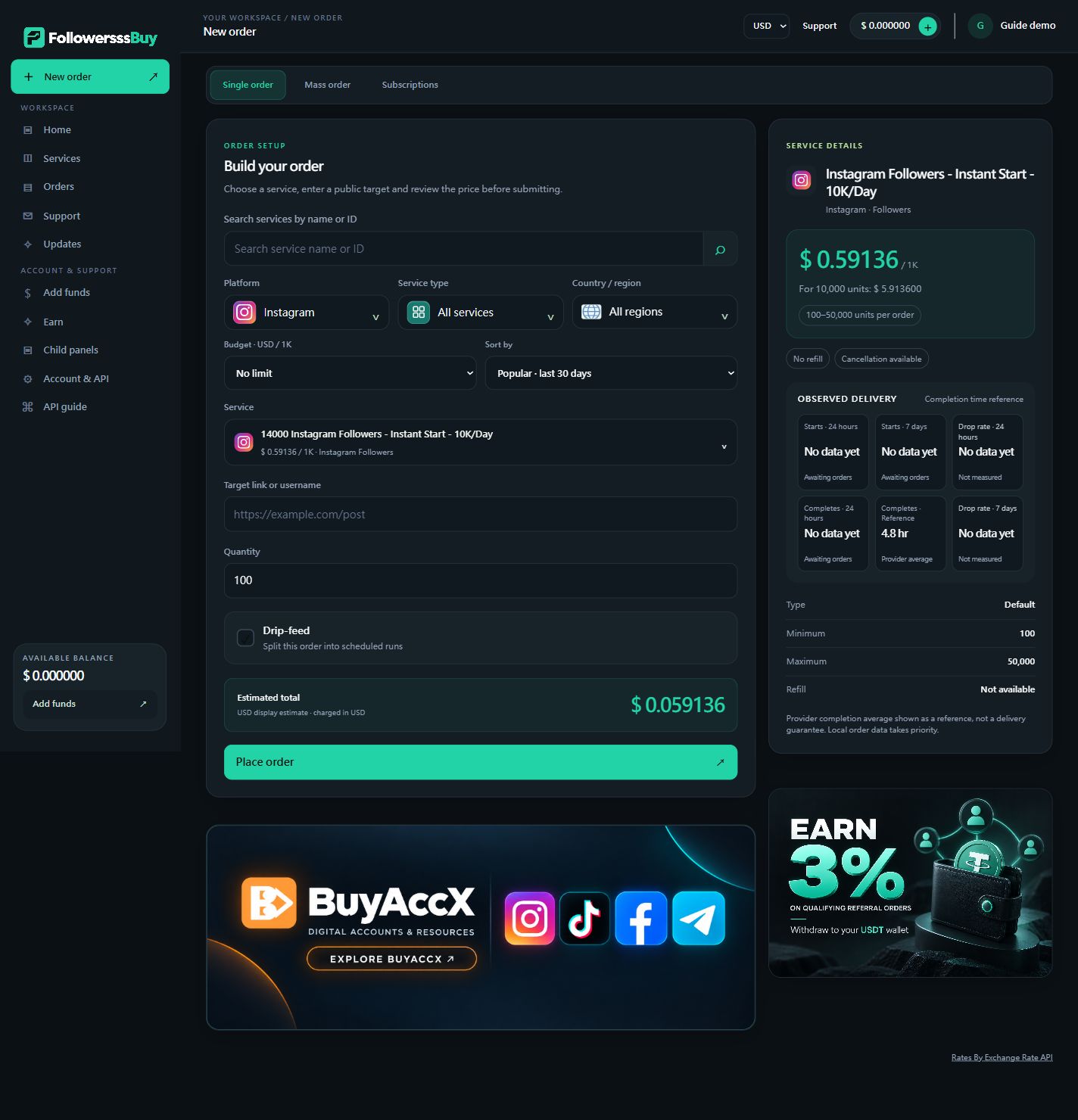
The New order page groups platform, service type, country/region, budget and sort options. New orders and platform changes default to All services; a platform change also resets the region to All regions. The other filters remain independent.

  • Search by service name or ID to select a service directly; the filters align to that service.
  • Review the full rate per 1,000 and the minimum/maximum quantity.
  • Use a public link or username appropriate to the selected service.
  • Custom comments show a text box with one comment per non-empty line.
  • Review the estimated total before submitting. An order is not placed merely by opening a service.
FollowersssBuy New order interface with five filters, a selected service and order fields
Actual interface, demonstration account. Public catalog snapshot; rates and availability can change. Tap the image to inspect the full screenshot.
02 / READ DELIVERY INFORMATION

Understand the time, not just the number.

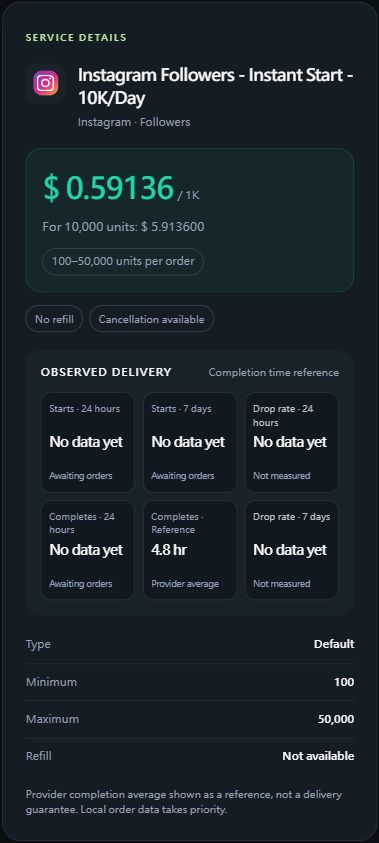
Service details have two rows of three cards: starts over 24 hours and seven days, completion information, and post-completion drop-rate slots. Available completion averages appear in the same Average time card.

  • Starts: elapsed time from order creation to recorded start.
  • Completes: elapsed time from creation to recorded completion.
  • Average time: the available completion-time estimate, not a delivery guarantee.
  • No data yet: no usable timing samples for that window.
Drop rate is not measured yet.

The cards currently show No data yet / Not measured. Delivery remains or “% delivered” do not measure followers/likes lost after completion. Missing data is not 0% loss, and no retention guarantee is implied.

Service details showing six timing and drop-rate cards with completion information and unmeasured drop rates
The screenshot uses a real public service reference. Its displayed reference is illustrative of the interface, not a delivery promise.
03 / COMPARE THE CATALOG

See the terms before you choose.

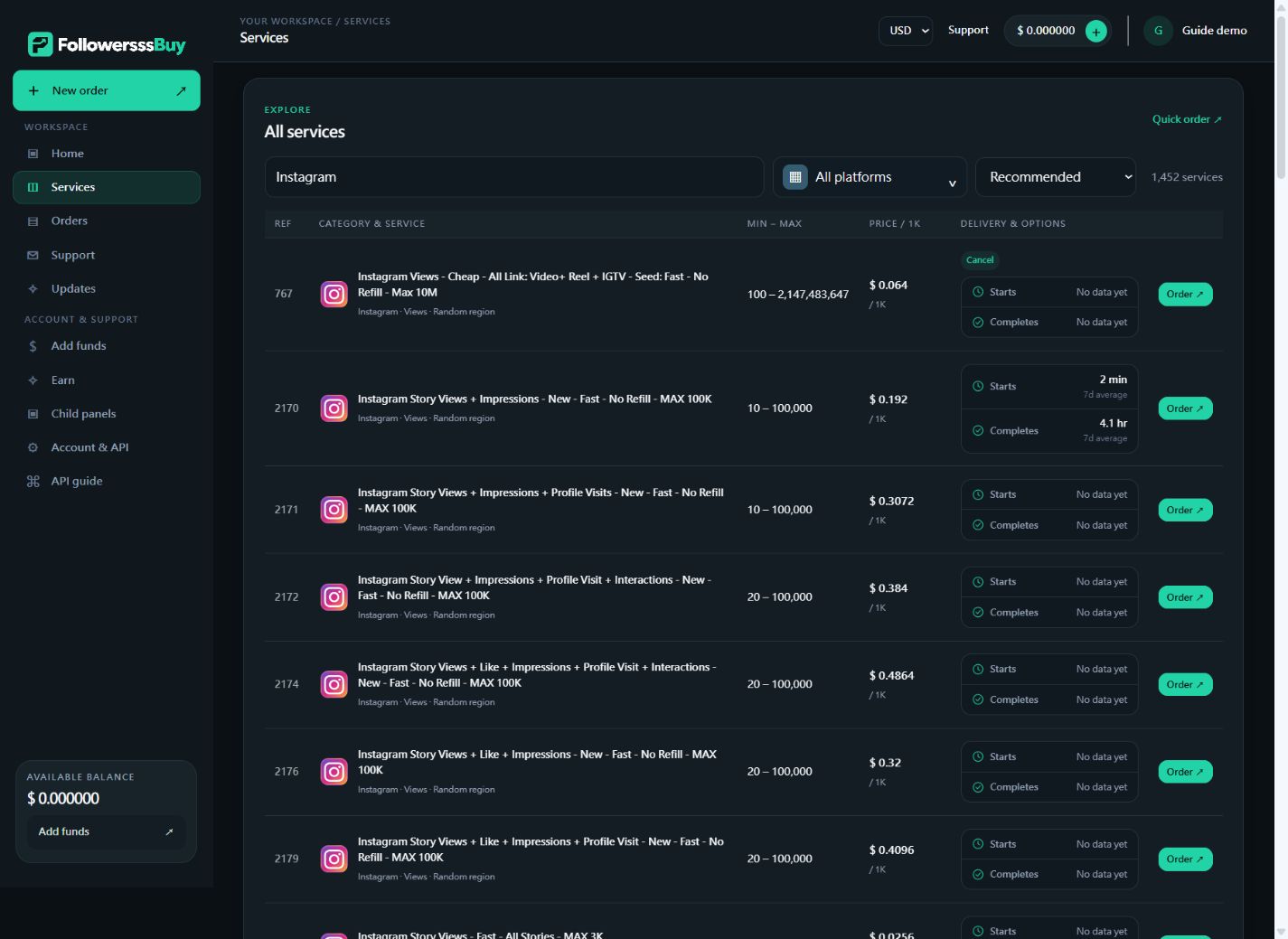
The service list shows service IDs, platform/type/region, current rates, quantity ranges and compact start/completion information. Completion estimates use the Average time label; unavailable data remains clearly marked.

  • Open a service’s Order link to select that exact service.
  • Compare region-targeted and random-region products separately.
  • Do not confuse video views with comments or ordinary likes with comment likes.
  • Check the chosen service’s refill and cancellation conditions, not another service’s terms.
FollowersssBuy service catalog with service IDs, platform logos, order limits, rates and labelled delivery information
Real catalog interface using public service data. Individual services, prices and timing references may change.

After the order: progress, support and your next steps

Order history and remaining quantity

Orders shows the reference, target, service ID/name, charge, quantity, start count when recorded, remaining delivery quantity and current status. “% delivered” is delivery progress, not post-completion drop rate. Pending or in-progress orders have not necessarily started immediately.

Refill, cancellation and tickets

Availability depends on the service and order state. Use the relevant request if offered, or open a support ticket with your own order reference and details. Receiving a request is not a guarantee that a supplier can cancel, refill or speed up an order. Keep follow-up messages in the same ticket.

Mass orders and drip-feed

Mass order accepts multiple links or the line format service ID | link | quantity. Drip-feed splits a supported order into scheduled runs. Read the selected service’s restrictions and the displayed reservation/total before submitting; a scheduled run is not a guarantee of completion by a fixed deadline.

Future-post packages and reseller API

Future-post subscriptions are offered only for eligible services and have service-specific rules. Resellers can generate an API key in Account & API and use our documented endpoint for supported actions. Keep keys private; screenshots here never show account secrets.

Read API documentation ↗

From your first account to your first order

  1. 01

    Create your account

    Register, then sign in to keep orders, balance and support in one workspace. Never send your social-platform password in an order link.

    Open this step ↗
  2. 02

    Add balance

    Open Add funds and use an available payment method. Review gateway fees, credited amounts and any displayed conditions before paying.

    Open this step ↗
  3. 03

    Compare services

    Choose the platform, service type and region. Check rates, quantity limits, descriptions and refill/cancellation options.

    Open this step ↗
  4. 04

    Place and follow an order

    Enter the required public target and quantity, review the total, then submit. Track the order reference in Orders; support requests must refer to your own orders.

    Open this step ↗